Introducing Edublocks and The Ledger:
Welcome to the year 2026, where learning is earning. Your ledger account tracks everything you’ve ever learned in units called Edublocks. Each Edublock represents one hour of learning in a particular subject. But you can also earn them from individuals or informal groups, like a community center or an app. Anyone can grant Edublocks to anyone else. You can earn Edublocks from a formal institution, like a school or your workplace. The Ledger makes it possible for you to get credit for learning that happens anywhere, even when you’re just doing the things you love. Your profile displays all the Edublocks you’ve earned. Employers can use this information to offer you a job or a gig that matches your skills. We’ll keep track of all of the income your skills generate, and use that data to provide feedback on your courses. When choosing a subject to study in the future, you may wish to choose the subject whose students are earning the most income. You can also use the Ledger to find investors in your education. Since the ledger is already tracking income earned from each Edublock, you can offer investors a percentage of your future income in exchange for free learning hours. Our smart contracts make these agreements easy to manage and administer. The Ledger is built on blockchain, the same technology that powers bitcoin and other digital currencies. That means every Edublock that has ever been earned is a permanent part of the growing public record of our collective learning and working. (source)
If the excerpt above is not nauseating/scary or interesting/exciting enough for you - here's the full video:
Other similar efforts include OTLW and BadgeChain, especially when combined with something like Knewton.
Showing posts with label apps. Show all posts
Showing posts with label apps. Show all posts
Monday, April 18, 2016

Saturday, February 13, 2016
The Garden as a Story Map and in Virtual Reality
The Garden of Earthly Delights by Hieronymus Bosch features prominently in the The Bonobo and the Atheist by Frans de Waal. Of course, to see it you need to visit the Museo del Prado in Madrid, so here are a couple of less expensive options:
Bosch VR app trailer from BDH on Vimeo.
- You can experience The Garden in Virtual Reality if a) you own Google Cardboard and b) download the free Bosch VR app.
- Or, download the Bosch Non-VR app for your iPad.
- Jheronimus Bosch, the Garden of Earthly Delights is an interactive and narrated documentary or Story Map.
- Or, keep it simple with this one: The Garden of Earthly Delights.
Monday, October 12, 2015
Noticing Tools STEM Pack
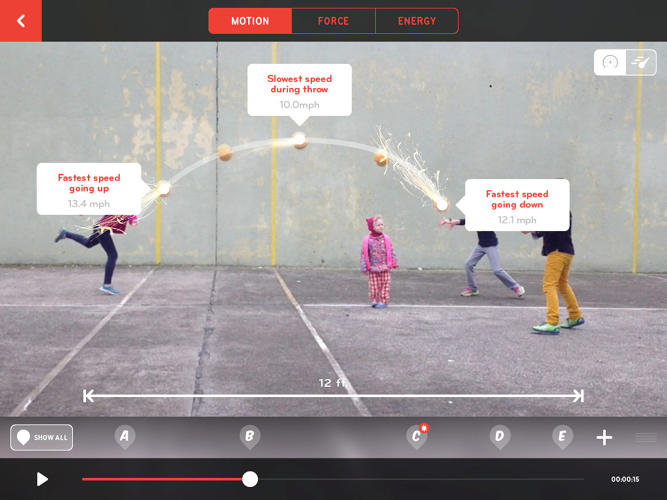
Here's another suite of fun and educational apps for the iPad: Noticing Tools by the New York Hall of Science, for example Playground Physics. Read more over at Co.DESIGN or risk $9.99 to try them out!

Thursday, October 1, 2015
Tinybop Apps
Tinybop Apps are interactive 'playscapes' for curious people of every age. The app design and interactive visualizations are simply incredible. Choose from:
- The Human Body
- Plants
- Homes
- Simple Machines
- The Earth (my favorite)
- Robot Factory
- The Everything Machine (review on Co.DESIGN)
Unfortunately they are only available for iOS...sorry Android folks.
Wednesday, September 23, 2015
Storytelling with...
There are many great tools and apps out there for digital storytelling - here is a selection that you may find useful:
- Storytelling with Maps - for example Boston Snow 2015, The Garden of Earthly Delights, or The Connecticut River Higher Education Greenway.
- Storytelling with Videos and movies - for example you can create your own animated video with Plotagon, annotate a movie (or book) with SocialBook, or annotate a video with VidBolt.
- Storytelling with Apps - for example Connection - Hollywood Storytelling meets Critical Thinking.
- Storytelling with Infographics - for example using Easel.ly, Canva, or Infogr.am.
- Storytelling with Comic Strips, Church Signs, Memes, or Cartoons.
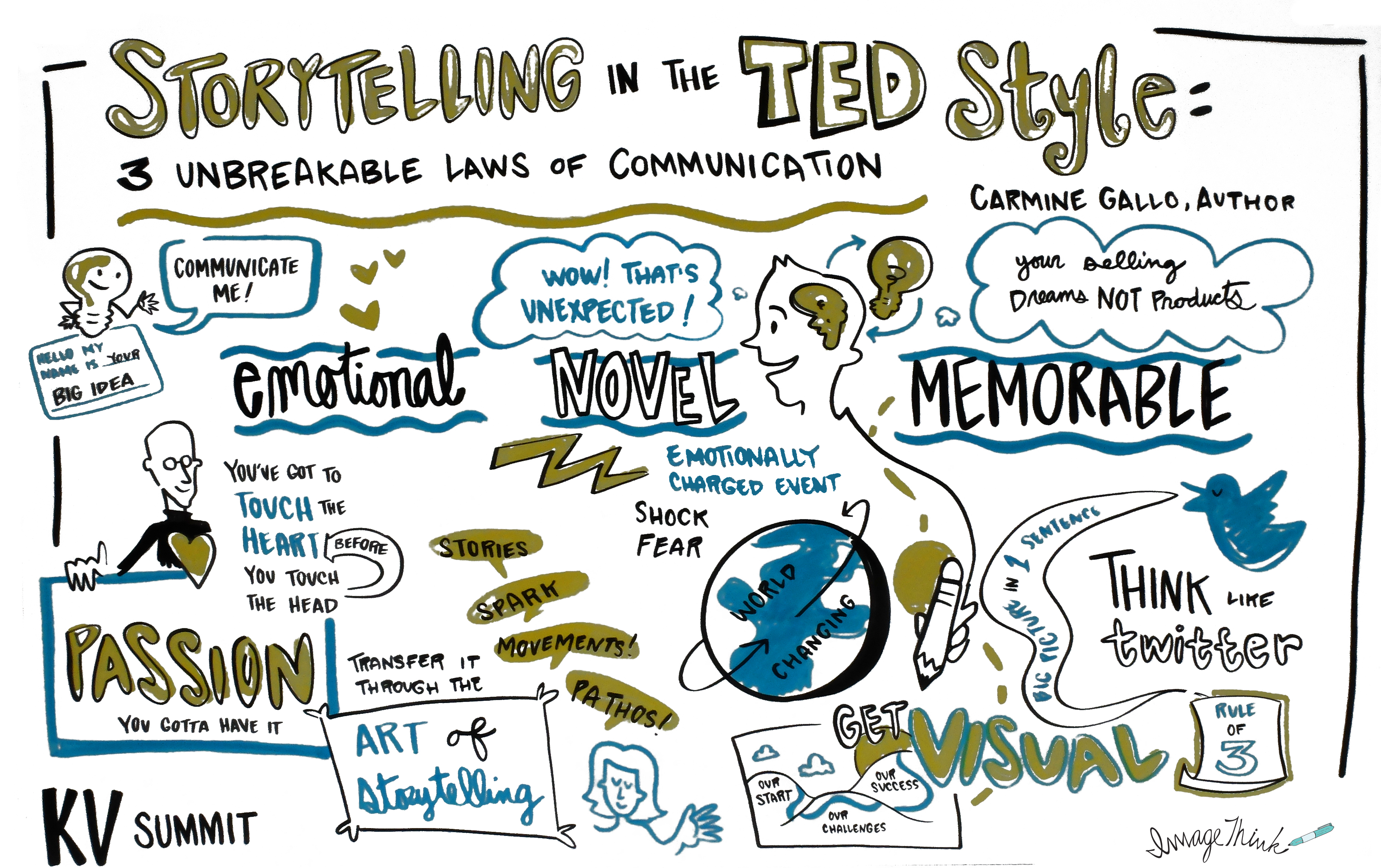 |
| http://www.khoslaventures.com/the-unbreakable-laws-of-storytelling |
Tuesday, September 15, 2015
Bloomin' Apps
Kathy Schrock's Guide To Everything has a nice section called Bloomin' Apps where she compiles and reviews apps for iPad, Android, Google, Windows, and Web 2.0 that support the different levels of Bloom's Revised Taxonomy, including:
If that's not enough for you...have a look at the Teaching Professor Tips app (available for iOS and Android) that delivers a useful teaching tip daily to your smart phone or tablet.
Even more ridiculous: let's turn college life and academic success into a game - consider the Ball State Achievements app (reviewed here by Wired Campus).

Even more ridiculous: let's turn college life and academic success into a game - consider the Ball State Achievements app (reviewed here by Wired Campus).

Friday, March 20, 2015
Pr. Erica Morin on Cell phones
In-Class
Research Activities with Cell Phones
|
|

Cell phone use
during class time is infuriating. Our students struggle to disconnect from
their phones for even 50-75 minutes. (I am guilty, too. I check my iPhone at
least 500 times a day.) But cell phones are absolutely forbidden in my class. I
have an incredibly strict NO PHONE ZONE policy. My syllabus reads, verbatim,
“If I see, hear, or sense a cell phone during class time, the entire class gets
a pop quiz immediately.” This policy has proven incredibly effective. Students
are terrified of having a pop quiz and loath to incite the ire of all their
classmates. Over the entire semester, I maybe give 1-2 quizzes across all my
course sections, and I have never given more than one pop quiz to the same class.
The lesson is learned the first time.
But I am not immune
to arguments on the other side of the spectrum. Rather than enforcing “no phone
zones,” some educational experts suggest embracing cell phones as valuable learning tools that put the entire
Internet at students’ fingertips.[1]
Smart phones have become so pervasive and ubiquitous, it might be easier and more
beneficial to integrate such devices into the classroom, instead of fighting
the “inevitable.”[2] Additionally, our students are growing more
and more accustomed to (read: dependent upon) using technology, so they are comfortable with that learning
platform.[3]
Especially at larger institutions, like Texas Tech and Purdue, where I
previously taught, mobile devices can be integrated into classroom
participation and virtual discussions with programs like Socrative, Polls Everywhere, and
HotSpot.[4]
For larger classrooms where participation can be challenging, these apps allow
students to ask and answer questions, offer feedback, and, generally, get
involved, from the palm their hand. These apps are less necessary at Westfield
State, perhaps, given our smaller class sizes, but they offer a glimpse at the
educational possibilities of mobile devices.
I am not completely
sold on the idea of cell phone use in the classroom for a number of reasons,
however. First, I think they pose an enormous potential for distraction, even
when very closely monitored. It only takes one text message or Tweet or Yak or
Facebook notification to completely derail a student’s focus. The temptation to
do other things often outweighs the ability of the instructor to maintain
productive engagement within the specified activity. Second, I do not like the
idea of our students further retreating into their cell phones and virtual
worlds. Mobile devices and technology in the classroom should not be a substitute
for them making eye contact, opening up their mouths, and speaking to each
other.

I feel like I am already noticing a decline in conversational confidence
and interpersonal skills among millennial
students.[5]
I am inclined to blame this trend, at least in part, on the never-ending
ability of our students to interact virtually and anonymously via the Internet
and Social Media. I want my students to talk, out loud, to one another, on a
daily basis, so technology will never replace verbal discussion for me. Lastly,
although smart phones are incredibly common, they are not universal. I do not
want to marginalize lower-income and non-traditional students because they do
not have or want the latest mobile device. As a result, I am wary of creating
an assignment that “requires” a smart phone. In the past, I have brought my own
smart phone, tablet, and laptop to the class, and encouraged students with
multiple devices to share with their classmates and it has never been an issue.
Or, as you will see below, you can ask the groups to designate one “researcher”
in order to limit them to one phone per group. (Also, the other implicit
hesitation underlying all this is the fact that the Wifi rarely works in my classroom, so actually connecting to the
Internet may be a concern.)
With all that said, I am trying. I have created a few activities for my upper-level history courses that include the use of cell phones. Each activity is highly-structured and closely monitored, in order to keep students on track. I have experienced wonderful success with these activities, and I intend to repeat them, with a bit of tinkering, of course. I follow a simple formula. I have a Tuesday/Thursday schedule for my upper-level courses in which I generally give a lecture introducing and explain the content on Tuesday, and then we have a discussion and/or activity on Thursday. For these cell phone activities, students engage in a group discussion based on preassigned readings and then break out into small groups to research a specific topic related to the readings. Students use their smart phones or tablets as personal research tools. I will provide a few examples of how I use this format with several topics and an assessment of the results.
With all that said, I am trying. I have created a few activities for my upper-level history courses that include the use of cell phones. Each activity is highly-structured and closely monitored, in order to keep students on track. I have experienced wonderful success with these activities, and I intend to repeat them, with a bit of tinkering, of course. I follow a simple formula. I have a Tuesday/Thursday schedule for my upper-level courses in which I generally give a lecture introducing and explain the content on Tuesday, and then we have a discussion and/or activity on Thursday. For these cell phone activities, students engage in a group discussion based on preassigned readings and then break out into small groups to research a specific topic related to the readings. Students use their smart phones or tablets as personal research tools. I will provide a few examples of how I use this format with several topics and an assessment of the results.
Course: U.S. Environmental History
Topic: National Park creation

Course: U.S. Constitutional History
Topic: The Bill of Rights in Modern Cases
This course covers
the formation and evolution of the United States Constitution. This particular activity
occurs late in the semester after students have thoroughly covered the
historical background of the Bill of Rights and are prepared to discuss current
Supreme Court cases related to these rights. Students are divided into partners
or groups of three and given a piece of paper with a constitutionally-protected
right written on it. (These rights are more specific than simply “freedom of
speech.” They are better classified as “elaborated rights.” For example, it is difficult to say freedom
of speech without specifically listing or explaining what that means in terms
of more specific rights. Some of the “elaborated rights” protected under
freedom of speech are protest speech in opposition to the government, obscenity and pornography, symbolic speech like
flag burning, and recently, political speech in the form of campaign
donations, to name just a few examples.) So each student group receives an
“elaborated right,” then they are assigned to find an example of a recent
Supreme Court decision that interpreted this right. The small groups use their
phones or other devices to look up cases and complete a worksheet which lists
the case name, case events, case decision, and contribution to our
understanding of the right. Each pair shares the cases with the class and I
create a cumulative list of current cases.
Course: Gender and the Environment
Topic: Hyper-masculinity in Advertisements Displaying
Nature
This
interdisciplinary course explores male and female interactions and
representations related to the natural environment in U.S. history and
incorporating global examples. Over the course of the semester, students examine
the many, many ways in which nature is infused with gender connotations and/or
connected to gendered values and attributes. Very frequently, the environment
is feminized, especially in relation to “mother nature,” the language of
conquest, and who cares about protecting nature. Conversely, representations of
men in/and nature are often hyper-masculinized. Advertising is an especially
rich source for examining this dichotomy. Many
advertisements
featuring men and nature are comically, stereotypically, shamelessly masculine.
In this activity, students are split into pairs. They are instructed to find
the best example of an advertisement (print or video) that combines nature and
a representation of masculinity. Students share links to their findings on a
previously-used online forum, like Blackboard Discussion or Google Docs. The
results are informative, hilarious, and appalling. (My favorites are Dr. Pepper Ten,[7]
Old Spice,[8]
and various reality TV shows, like Ax Men, Mudcats, or Man vs. Wild.)
Assessment

I believe this simple formula can be incorporated into a wide range of courses. Basically, the instructor just needs to develop a specific topic of inquiry that is relevant for their curriculum. If students are provided with context, clear instructions, and a final deliverable to ensure accountability, they will be able to use their mobile devices for a productive classroom assignment. At the same time, the instructor must be vigilant. I have no patience for tomfoolery. The students have a task to complete and I monitor their progress closely. At the end, each group must share their findings with the class. If I catch any non-assignment activity, the quiz rule still stands (which students are informed of in advance).
In part, I think
the success of these activities is because I am so strict with phones for 99%
of the class. My students are accustomed to absolutely no cell phones. Ever.
For any reason. End of story.
Therefore, when
they are allowed to use their phones, it is a fun and exciting activity. They know
that I trust them and most want to have this same opportunity or activity again
in the future. As a result, engagement is high, noncompliance is almost
nonexistent, and outcomes are awesome.
For me, though, the
distraction and temptation of cell phones far outweighs the daily classroom
value. I will not be adopting a “run what you brung” approach anytime soon.[9]
But I do think that mobile devices can be valuable for limited classroom
activities in highly structured settings with pre-existing rules.
Assistant Professor Erica Morin, History Department
Assistant Professor Erica Morin, History Department
Monday, December 1, 2014
Tech Tools Students Need!
This from Wired Campus: Tech Tools Students Say They Can't Live Without
The obvious caveats apply: these are selected graduate students from an expensive private school and this video is heavily edited. Nevertheless, here are a few things I noticed:
At Westfield State, only about 22 percent of respondents to the Fall 2013 Student Technology Survey reported owing a tablet computer. On the other hand, 97 percent (!) reported owing a laptop computer - a percentage that seems unreasonably high and suggests a sampling bias. That being said, the ECAR (2014) nationwide survey found student laptop ownership at 90 percent and tablet ownership at 47 percent.
The obvious caveats apply: these are selected graduate students from an expensive private school and this video is heavily edited. Nevertheless, here are a few things I noticed:
- I heard the words tablet and app a lot.
- MacBooks are clearly the laptop of choice.
- Paper and pen are still widely used 'tech' tools.
At Westfield State, only about 22 percent of respondents to the Fall 2013 Student Technology Survey reported owing a tablet computer. On the other hand, 97 percent (!) reported owing a laptop computer - a percentage that seems unreasonably high and suggests a sampling bias. That being said, the ECAR (2014) nationwide survey found student laptop ownership at 90 percent and tablet ownership at 47 percent.
Monday, November 24, 2014
iPad Teaching (Part 6): More Apps!
But wait...there's more...here's a selection of apps and things suggested in response to my last blog post (aka crowd-sourced):
- Dartfish Easy Tag (iOS and Android) can be used to define actions or behaviors and then collect data during observations. Ask Heidi Bohler for more information!
- Outsmart Invasive Species (iOS and Android) is a citizen science / crowd-sourcing app to help with invasive-species monitoring.
- The Storehouse app (iOS only) looks great for visual storytelling with photos and videos (read a review on Co.DESIGN).
- TouchCast (iOS or PC) allows you to create interactive videos with embedded web content - here's an example from MIT.
 |
| http://www.pcmag.com/article2/0,2817,2463858,00.asp |
Friday, November 21, 2014
iPad Teaching (Part 5): The End!
iPads (...replace iPad with your tablet of choice...) are great for teaching and learning. That being said, articles such as Making the iPad the Center of the Academic Experience or infographics such as iPad as the Teacher's Pet make the seem as though tablets (and their associated apps) are the solution for the ills of education today. Students, on the other hand, seem to view tablets as entertainment devices (according to a recent study at Ball State University). Still, there is good evidence that tablets can improve learning (here and here).
Here are a few cool things to do with a tablet (or smartphone):
Finally: how about storytelling with the Connection Storymaker App (available for iOS and Android)?
Here are a few cool things to do with a tablet (or smartphone):
- Use your tablet as a document camera (aka Elmo).
- Use your tablet/smartphone as a remote control for anything running inside Google Chrome, for example Google Presentations, Prezi, Slideshare, etc.) with de Mobo.
- Screencasting with an iPad by recording your hand writing on the touchscreen.
Finally: how about storytelling with the Connection Storymaker App (available for iOS and Android)?
Friday, November 14, 2014
iPad Teaching (Part 3): Screencasting and Whiteboard Apps
The idea is simple: capture everything you do on the screen, plus your voice, and package it all into a format that you can use in-class or share with your students via Google Drive, a website, or a CMS like PLATO. An example of that for a PC or Mac would be Jing by TechSmith and here are four apps for the iPad:
- Educreations is free and provides a hosting service for your creations. Here is a nice demo/tutorial video (6:15 minutes).
- Explain Everything is $2.99, offers more capabilities, and is available for iOS, Android, and Windows. Here is a nice demo/tutorial video (5:27 minutes).
- Doceri gets excellent reviews and is available for iOS and Windows 8 tablets.
- Show Me is similar to Doceri and creates 'videos' that are shared online. Here is a nice demo/tutorial video (7:14 minutes).
Profhacker has a nice review and comparison of Educreations and Explain Everything.
In my experience all four apps work just fine IF you upload your finished screencasts to the cloud and use them the same way you would use any prepackaged online content. It would be much more interesting to use these apps combined with the iPad touchscreen 'live' in-class, but there is a problem: how do you connect your iPad to the classroom projector? More about that next week!
In my experience all four apps work just fine IF you upload your finished screencasts to the cloud and use them the same way you would use any prepackaged online content. It would be much more interesting to use these apps combined with the iPad touchscreen 'live' in-class, but there is a problem: how do you connect your iPad to the classroom projector? More about that next week!
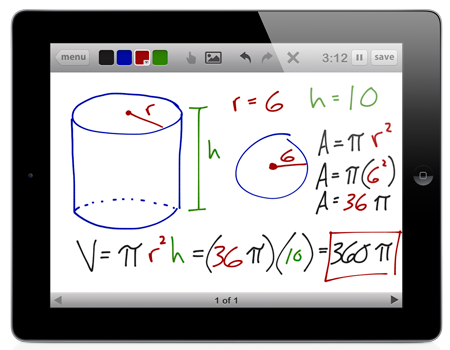 |
| Educreations |
Subscribe to:
Posts (Atom)